Tracing
Hayhooks tracing builds on Haystack tracing APIs and standard OpenTelemetry configuration.
Install
Install tracing extras first:
pip install "hayhooks[tracing]"
This installs the OpenTelemetry SDK, OTLP exporters, and FastAPI/Starlette instrumentors used by Hayhooks. Dashboard frontend source files are bundled in Hayhooks wheels for local runtime builds.
Quick Start (OTLP)
Set OpenTelemetry environment variables, then run Hayhooks:
export OTEL_SERVICE_NAME=hayhooks
export OTEL_EXPORTER_OTLP_ENDPOINT=http://localhost:4318
export OTEL_EXPORTER_OTLP_PROTOCOL=http/protobuf
export OTEL_TRACES_SAMPLER=parentbased_traceidratio
export OTEL_TRACES_SAMPLER_ARG=1.0
export HAYHOOKS_TRACING_EXCLUDED_SPANS='["send", "receive"]'

hayhooks run
Using OTEL_EXPORTER_OTLP_TRACES_ENDPOINT
If you set OTEL_EXPORTER_OTLP_TRACES_ENDPOINT directly for HTTP transport, use the full traces path
(for example http://localhost:4318/v1/traces).
Local Backends
SigNoz
Start SigNoz locally:
git clone -b main https://github.com/SigNoz/signoz.git
cd signoz/deploy/docker
docker compose up -d --remove-orphans
Open SigNoz at http://localhost:8080, then go to Traces and filter by service hayhooks.
Jaeger
If you want a lighter single-container setup:
docker run --rm -d \
  --name jaeger \
  -e COLLECTOR_OTLP_ENABLED=true \
  -p 16686:16686 \
  -p 4318:4318 \
  jaegertracing/all-in-one:latest
Open Jaeger at http://localhost:16686 and use the same OTEL_* variables shown above.
Live Dashboard
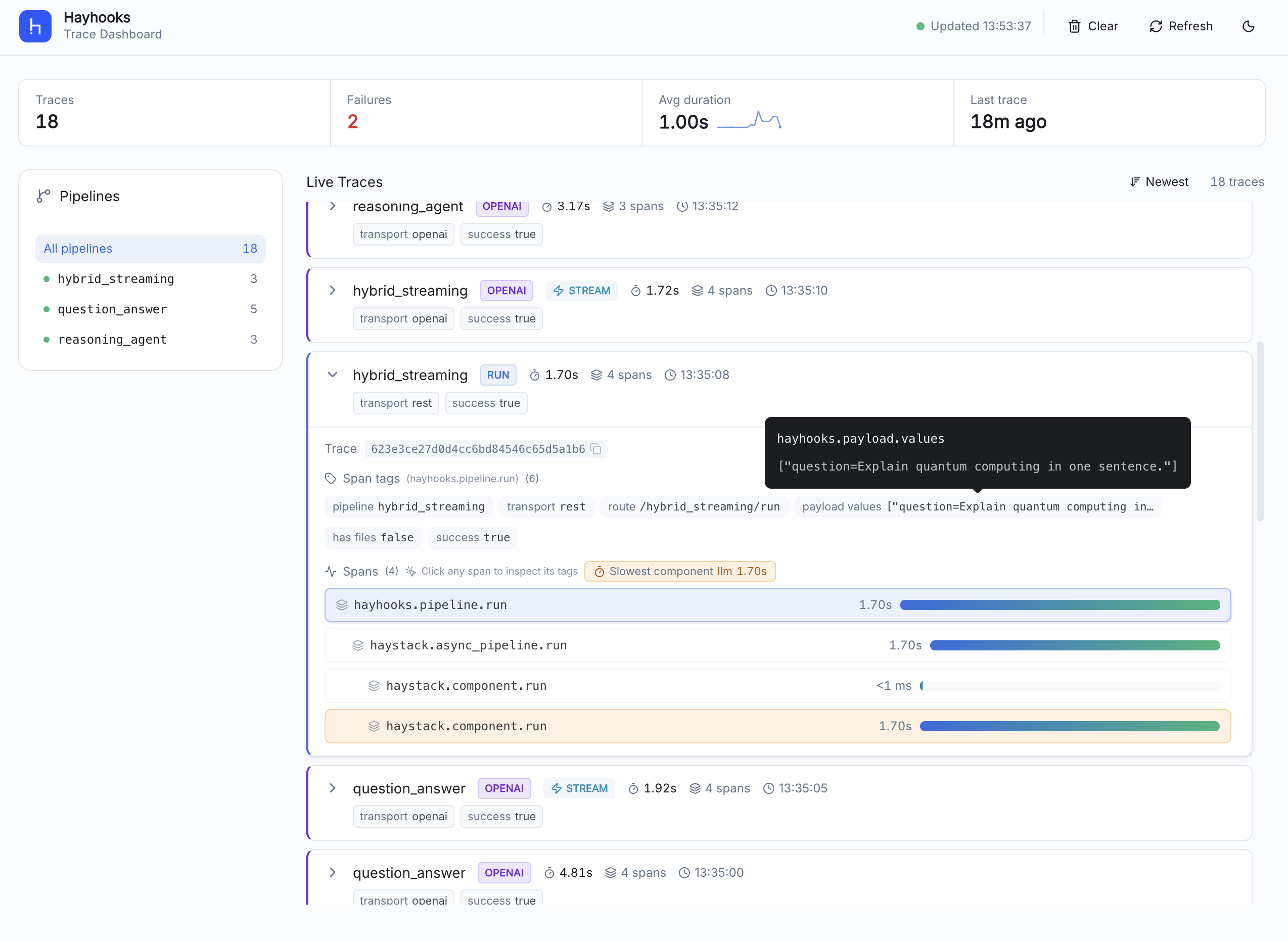
Hayhooks includes a built-in trace dashboard at /dashboard that provides real-time visibility into pipeline operations.
Features
- Live trace feed — auto-refreshes (default every 2.5s, configurable via
HAYHOOKS_DASHBOARD_UI_POLL_MS) with new-trace animations. - Pipeline filter — click a pipeline in the sidebar to filter traces; counts update per pipeline.
- Span waterfall — expand any trace to see nested spans with duration bars, per-span pipeline badges, and
readable Haystack component labels on
haystack.component.runspans. - Slowest component signal — highlights only the single slowest component span per trace when its duration is above the configured threshold.
- Kind badges — each trace shows a kind badge (run, openai, deploy, undeploy, mcp) for at-a-glance classification.
- Streaming indicator — streaming requests get a visible STREAM badge beside the kind badge.
- Summary tags — collapsed cards show transport and success/error status; expanded view shows all tags with tooltips and a copyable trace ID.
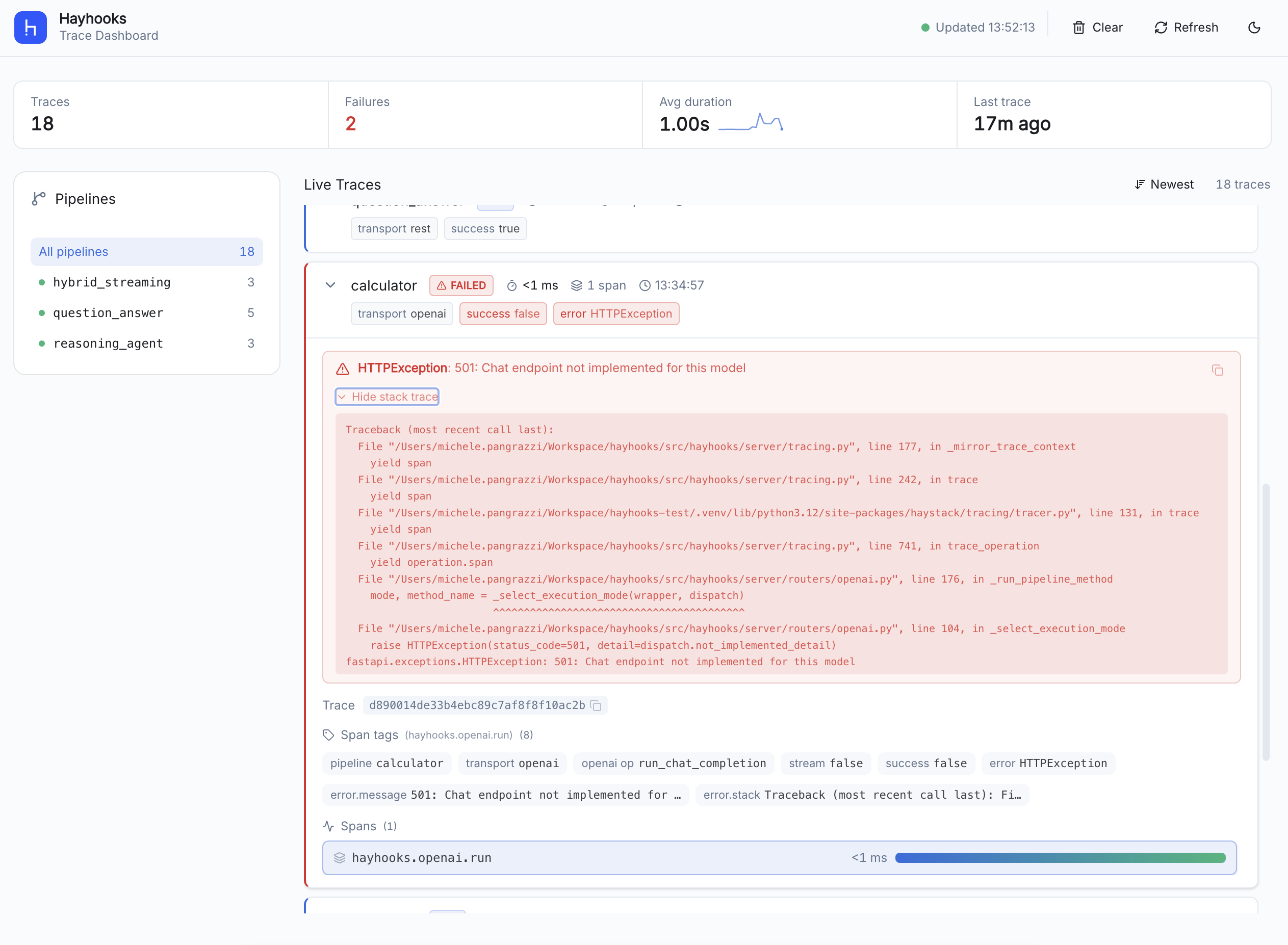
- Error detail — failed traces display error type, message, and an expandable/copyable stack trace.
- Sort — toggle between newest-first and slowest-first ordering.
- Stats — pipeline trace count, failure count, average duration with sparkline, and last-trace time, all reflecting the active filter.
- Dark mode — toggle between light and dark themes via the header button.
- Clear traces — wipe the local trace buffer from the header.
Error Traces
When a pipeline request fails, the dashboard highlights the affected trace with a red left border and a failed badge in place of the kind badge. Expand the trace to see:
- Error type and message — shown at the top of the detail area in the error block.
- Stack trace — expandable section with a copy button for sharing or debugging.
Setup
Enable and run the dashboard from CLI:
hayhooks run --with-tracing-dashboard
The --with-tracing-dashboard flag enables dashboard mounting and builds the frontend at runtime from the
packaged dashboard source files.
To build the frontend at runtime, Node.js/npm must be available on the machine.
If you prefer configuring via environment variables instead of CLI flags:
export HAYHOOKS_DASHBOARD_ENABLED=true
cd dashboard
npm install
npm run build
export HAYHOOKS_DASHBOARD_DIST_DIR="$(pwd)/dist"
hayhooks run
For frontend-specific workflows (local Vite dev server, lint/test/build commands), see the dashboard frontend README.
Trace Source
The dashboard always reads traces from Hayhooks' in-process live trace buffer.
- No dashboard-side Jaeger/SigNoz fetching is used.
- No extra dashboard backend mode configuration is required.
- You can still export traces to external backends via standard
OTEL_*variables for observability tooling, while the dashboard remains a local live view. - The in-memory buffer is capped (default:
200traces). Configure retention size with:
export HAYHOOKS_DASHBOARD_TRACE_BUFFER_CAPACITY=2000
Pipeline run traces include a hayhooks.payload.values tag. By default, this tag records payload shape metadata
(question=str(24), top_k=int, filters=dict(3)) instead of raw payload values. To include raw values during
trusted local debugging, opt in explicitly:
export HAYHOOKS_DASHBOARD_TRACE_INCLUDE_PAYLOAD_VALUES=true
Common sensitive keys such as api_key, token, authorization, password, secret, and credential remain
redacted even when raw-value capture is enabled.
Dashboard with multiple workers
Dashboard traces are stored in each worker process memory. If you run Hayhooks with multiple workers
(for example hayhooks run --workers 2), each worker keeps a separate trace buffer.
The dashboard may show only a subset of traces, and POST /dashboard/api/traces/clear only clears the
worker that served that request.
For a consistent dashboard view, run with a single worker (--workers 1).
Dashboard Tuning
The dashboard UI behaviour is configurable via environment variables (HAYHOOKS_DASHBOARD_UI_*).
All values are fetched by the frontend at page load from the /dashboard/api/config endpoint.
| Variable | Default | Description |
|---|---|---|
HAYHOOKS_DASHBOARD_UI_POLL_MS |
2500 |
Polling interval (ms) between trace list refreshes |
HAYHOOKS_DASHBOARD_UI_LIST_CAP |
100 |
Max traces kept in the browser list |
HAYHOOKS_DASHBOARD_UI_FETCH_LIMIT |
50 |
Traces requested per poll |
HAYHOOKS_DASHBOARD_UI_FRESH_MS |
6000 |
Duration (ms) a new trace keeps the "NEW" highlight |
HAYHOOKS_DASHBOARD_UI_SLOW_COMPONENT_MIN_DURATION_MS |
1000 |
Threshold (ms) to flag the slowest component |
For the full list of dashboard and tracing settings, see the environment variables reference.
Haystack component spans
By default, the dashboard includes both Hayhooks operation spans (deploy/run/openai/mcp lifecycle) and Haystack component spans in the same trace trees. To show only Hayhooks operation spans, disable:
export HAYHOOKS_DASHBOARD_TRACE_INCLUDE_HAYSTACK_SPANS=false
This feature flag only affects what gets mirrored into the dashboard buffer; it does not change dashboard UI filtering/sorting behavior. It also works without configuring an external tracing backend (local capture mode).
Run Hayhooks and open http://localhost:1416/dashboard.
A demo script is available to generate representative traces across multiple pipelines:
bash scripts/demo_dashboard_traces.sh
The script deploys example pipelines, fires REST and OpenAI-compatible streaming/non-streaming requests, then undeploys — producing a mix of trace kinds, success/failure states, and streaming indicators for exploring the dashboard UI.
API Endpoints
| Endpoint | Method | Description |
|---|---|---|
/dashboard/api/config |
GET | Fetch dashboard UI polling/list settings |
/dashboard/api/entrypoints |
GET | List deployed pipeline names |
/dashboard/api/traces |
GET | Fetch recent traces (supports limit, since_ms, and after_seq query params) |
/dashboard/api/traces/clear |
POST | Clear the local trace buffer |
GET /dashboard/api/traces returns:
traces: normalized trace summaries for the requested page.next_after_seq: cursor value to pass asafter_seqon the next incremental request.has_more: whether additional trace updates are available beyond the returned page.
The same cursor is also exposed in the X-Hayhooks-Trace-Cursor response header for clients that prefer header-based
cursor handling.
Notes
- Hayhooks does not define a custom
HAYHOOKS_OTEL_*exporter namespace. Use standard OpenTelemetryOTEL_*variables. HAYHOOKS_TRACING_EXCLUDED_SPANSis a Hayhooks-specific instrumentation tuning option for framework span noise.- When
OTEL_EXPORTER_OTLP_ENDPOINT(orOTEL_EXPORTER_OTLP_TRACES_ENDPOINT) is set, Hayhooks attempts automatic OTLP bootstrap at startup usingOTEL_EXPORTER_OTLP_TRACES_PROTOCOL(fallback:OTEL_EXPORTER_OTLP_PROTOCOL, defaulthttp/protobuf). - For advanced setups, you can initialize your own OpenTelemetry tracer provider before importing Hayhooks/Haystack.